Forum
Official Store
Installation Guide
Firmwares
Login
Register
Forum
Car Model Discussion
Nissan Vehicles Discuss
Bluetooth Call Page Pops Up automatically on Nissan X‑Trail / Qashqai / Rogue
SD
Vip
Support Dasaita
Staff member
3/10/26, 8:49 AM
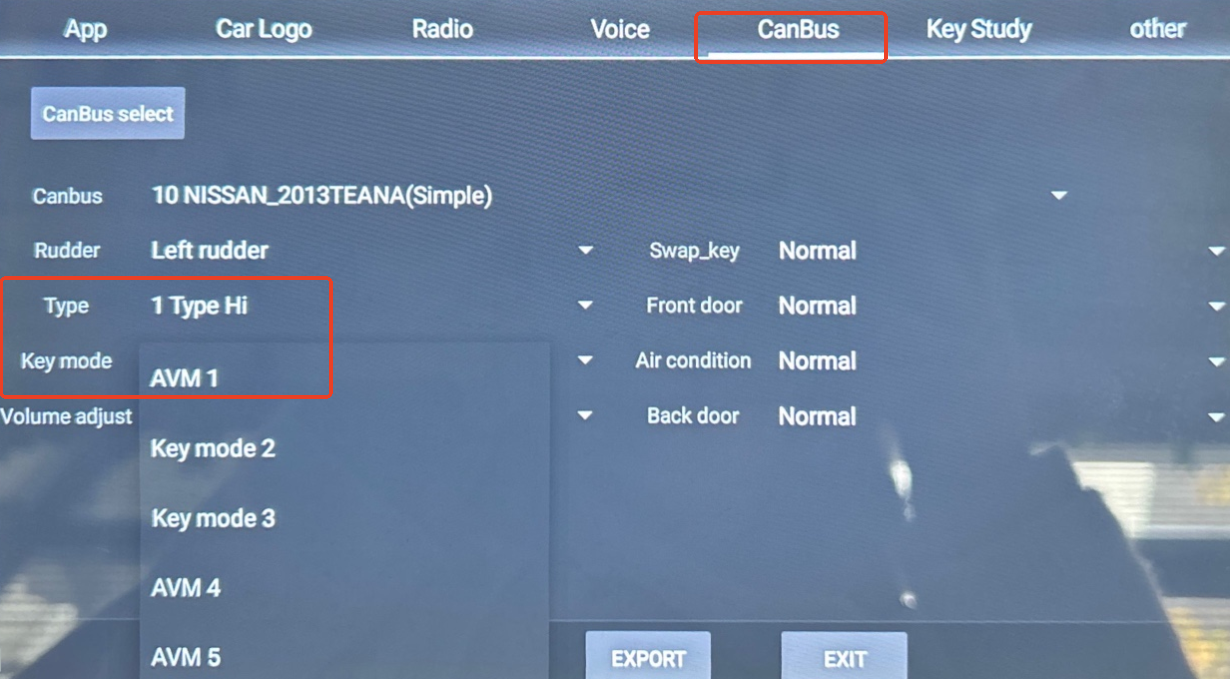
If the Bluetooth call screen appears automatically during driving or system startup,please don’t worry.
Just follow the step:
Go to Settings > Car > Factory Settings (password: 126) > CANBUS and Set
Type: 1 Type Hi
>
Key mode : AVM1
>Save>Exit>Reboot.
1
Posts
42
Views
Reply
Please
login
to reply to this topic!
Related topics
Dasaita PX6 Android 11 Nissan Qashqai Actualizar
Jaime Blanco Menéndez
8/6/25, 11:04 PM
9
Nissan Vehicles Discuss
»
Sommerzeit und Winterzeit einstellen funktioniert nicht beim Nissan X-Trail 2018 Dasaita PX6
Marius Krause
4/24/25, 6:17 PM
11
Nissan Vehicles Discuss
»
2018 QASHQAI with BOSE - CB068
Cyril MAILLOT
4/24/25, 5:48 AM
4
Nissan Vehicles Discuss
»
Nissan Qashqai J11b 2021 vivid firmware for my G13
JUAN JOSE FRAGOSO ARAUJO
4/9/25, 6:57 PM
2
Nissan Vehicles Discuss
»
2018 Nissan Rogue - Volume mute when open the phone
Jovan Mercado
1/16/25, 9:30 PM
5
Nissan Vehicles Discuss
»
Participants
SD
Support Dasaita
3/10/26, 8:49 AM
People who liked this
Email Verification
An email with a verification link will be sent to your email address.
[Email is not found]
Please login to continue
Please log in or register to continue
Login
Register
Search