2012 Tundra with JBL g13


  • Hello, 

    I recieved my g13 device with the following wire harness': DYX004-1 and CB005-2X. 


    After taking my dash apart to install the radio, neither of these harness' seem to plus into the existing wires correctly. I am aware that not all of the connections will be used, but leaving 3 seperate connections out seems a little bit much. I am looking for some clarification on what I need to do. 


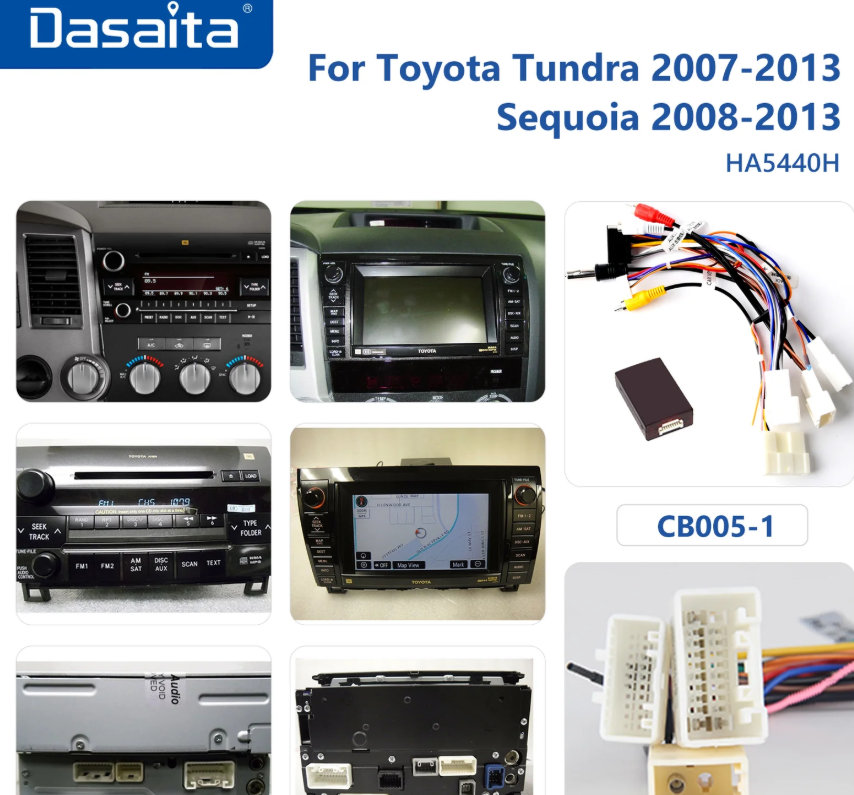
    After searching the forums for a bit and submitting an email for further clarification, I saw this post which is mentioned in the picture below. I have the top left radio with the "JBL" in the top center of the radio. One thing that sticks out to me is that this diagram calls for a CB005-1 type which is not what i received, or at least the packaging says its a CB005-2x. 

    Thank you for the help!


  • @Riley Sturzebecher 

    Hello,

    Thanks for your contact.

    It is integrated cable, so you don't need to connect all plugs. Please just connect the suitable one.

    Regarding to the steering wheel control,please try to reprogramme:

    Step 1. Please go Settings > Car > Factory settings (password:126) > Others > Steering wheel keys assign > SWC > Apply > Exit (Restart).


    Step 2. Please go Settings > Car > Steering Wheel Keys > start to program OR just open the App "Wheelkey Study" to program. We also attached a video showing how to reprogram the SWC keys for your reference, please check it out.


    Here is the studying video of steering wheel controlhttps://www.dropbox.com/scl/fi/ykiclryuzwmf2bf6bbg1k/Video-Steering-wheel-keys-assign-SWC-Key.mp4?rlkey=hwm530vzvtcj5tb2tyr28g5n6&st=qhmx5ffp&dl=0


Please login to reply this topic!
