I have a Dasaita PX6 with Android 10 and a Mitsubishi Outlander PHEV. Is there a working Scout/Vivid application available where Bluetooth and navigation would work on the main screen?
rk3399-userdebud 10 QQ2A-200305.004.A1 eng hct2. 20250401
MCU: V3.78
Bluetooth not working
I have an issue with myu canbus. My unit always powers off and never sleeps so my i have no instant wake. It always powers off. Please help will MCU update fix this? I have already checked all wires and tried mulitple Canbus profiles and different settings in options.
g13 QLED with knobs - toyota corolla 2021
Bonjour,
J'ai verifié toutes mes connexions et c'est ok. J'ai à présent la version MCU : MTCE_HA_V3.82e.
Le problème est le même certaines commandes au volant ne sont pas mappées correctement.
Pourquoi il n y a pas de profil canbus simple soft ou raise pour XTRAIL T32 ou QASHQAI ?
Avez une mise à jour MCU plus récente qui propose ces profils ?
Merci milles fois pour votre aide
Yannick
Bonjour,
J'ai verifié toutes mes connexions et c'est ok. J'ai à présent la version MCU : MTCE_HA_V3.82e.
Le problème est le même certaines commandes au volant ne sont pas mappées correctement.
Pourquoi il n y a pas de profil canbus simple soft ou raise pour XTRAIL T32 ou QASHQAI ?
Avez une mise à jour MCU plus récente qui propose ces profils ?
Merci milles fois pour votre aide
Yannick
i have tried calling and emailing support for a mcu update and I am not getting any help
Hello, I’m using a Dasaita G13 on my 2012 5th-gen 4Runner. Recently, the touchscreen has often stopped responding, and the audio disappears after I make or receive phone calls through Apple CarPlay. Do I need to update the firmware?
Build number
QCM6125 13 S10A_123 eng.hct.20241220.111810A
MCU version
MTCHS_HA4Z_V4.15a_1
Nov 14 2024 15:38:58
1. Technical Specifications of Your Head Unit
System Platform (Processor): ac8227l (Mediatek)
Current System Version (Build): WJ_2023.07.12.17_2224
Current MCU Version: CVD1810-WJ_23.02.10_339
Screen Type: Vertical 'Tesla-style' screen with integrated climate control (768*1024).
The Problem: The software on the radio dates back to 2023. Your brand new Samsung S26 uses much newer Bluetooth and Wi-Fi protocols, causing the radio's wireless chip to overload. This is what causes Spotify and the Android Auto display to lag and stutter.
@richard-cm
Android version: 12
Memory: 2G
Storage: 32G
System platform: ac8227l
Can info: HiWorld->GM->GM_P_W01
CAN version number: 146.0.1.20251110
Build number: WJ_2023.07.12.17_2224
Mcu version: CVD1810-WJ_23.02.10_339
Resolution info: 768*1024_YT097IBEK12006-A12
TP info: GT9xx_1024x768
I need updated MCU and firmware for android g13 - 2016 toyota 4runner - having microphone issues and screen stays black until reset is performed every time the car is turned off and then back on.
Model: QCM6125
Android: 13
Build: S10A_123eng.hct.20251030.193148 NA-V1
MCU: MTCH_HA4Z_V4.12b_1
@Dasaita Official
@Support Dasaita
@Kat Paulk
Hello,
Please update the Firmware & MCU to the latest version via the link below, here are some tips to help you get it done:
①G13_V1(20260409):
Make Sure your unit is QCM6125 Android 13
https://www.dropbox.com/scl/fi/h1e688co7vr53z30rtdlk/update.zip?rlkey=loanzw1z5hay4q0erpzj05qte&st=lp62ulvd&dl=0
②MCU(4.17a)
https://www.dropbox.com/scl/fi/6g03cdcsfz2ynsk2wnimm/hmcu.img?rlkey=cqxi7l0uaogy9tc8zdpr82329&dl=0
1.Download the documents ①&② through the link on your computer/laptop.
(Do not rename and Unzip the file)
2.Format the USB drive(FAT32 Format)before copying the Update.zip & hmcu.img file to it, then insert it to the USB cable,and it will pop out the firmware updating tips on the screen.
(Tick the option"Wipe data and format flash")
3.MCU updated GO:Settings>System>MCU updates.
Thanks for your time
I did submit a ticket to the support team but they stopped responding after I supplied what they asked for. I have sent multiple responses and even posted here (my post never showed up)
Is there an MCU update for my unit - 2018 Tundra w/ JBL?
Kernel - 4.14.190 #305 Fri Oct 31 12:20:06 CST 2025
Build Number - QCM6125 13 S10A_123 eng.hct.20251031.121031 NA-V2.1
MCU version - MTCHS_HA4Z_V4.16f_1 Jul 30 2025 16:20:57
I was wondering if I could get a MCU update I did the firmware update. I'm having an issue where my prompt and navigation sounds is quiet I did edit a setting under car and navigation sound mode and put to mix ans set it to 10 that did help barely with navigation. But still no prompt or texts. Music and such is good. It also will not let me allow notifications for zlink, says I don't have permissions. Thanks for your time.
@Dasaita Official
@Support Dasaita
Model QCM6125 G13
Build :QCM6125 13 S10A_123 eng.hct.20251031.121031 NA-V21
MCU :MTCHS_HAAZ V4.161.1
Hi, I have issue with wireless CarPlay audio stuttering/choppy with Android 11/PX6, wired is fine
What's the solution? Firmware update will fix it? And which firmware to use if it does?
hereis the details:
Build:
rk3399-userdebug 11RQ3A.210705.001 eng.hct2.20220602.134815 release-keys
Kernel version
4.19.193
#325 Tue May 31 17:09:30 CST 2022
MCU version
MTCE_HA_V3.78_1
May 31 2021 20:01:07
CPU
Dual-core Cortex-A72 @ 1.8G
Quad-core Cortex-A53 @ 1.5G
Memory
3936MB
@Lewis C
Hello.
For further confirmation, please tell us what is your UI(MAX11 or Vivid11).
Thanks in advance.
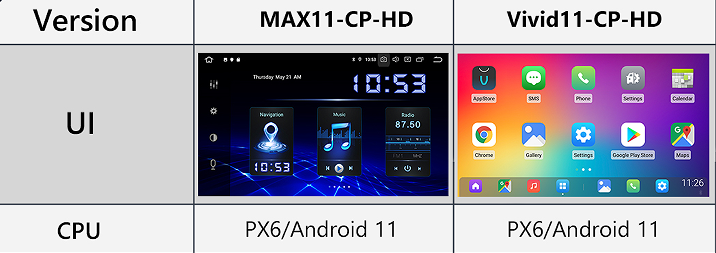
@IceyBiah
Hello.
Please check the update tutorial below then give it a shot.
Update File:
System Firmware-G13-V2-20260410:
https://www.dropbox.com/scl/fi/jwoqmanj15r8ktlroloy6/update.zip?rlkey=my6wh60a4z2r555fw6zd6zx57&st=kdihaggb&dl=0
MCU-4.17f:
https://www.dropbox.com/scl/fi/9t1gp2mkk3ertqyybpf5j/hmcu.img?rlkey=rs1abdmvfbk53331a024bps8j&st=dzwvztlg&dl=0
Tips:
1.
Download above update file via your computer/laptop.
2.
Format USB drive to FAT32 Format.
3.
Copy the file “update.zip”&“hmcu.img” to the root directory of USB drive.
4.
Insert USB drive into the unit via USB cable;
then it will pop up automatically a window of update.
Alternatively, please manually go "Settings > System > System updates/MCU updates" to start the update.
***NOTE:
Please make sure that you have ticked option "Wipe data and format flash!".
Reference Operation Video:
https://www.dropbox.com/scl/fi/7tgvc28sn77ux6g6fmosm/MCU.mp4?rlkey=7p5940e12kb88a42zue6qntft&e=1&dl=0
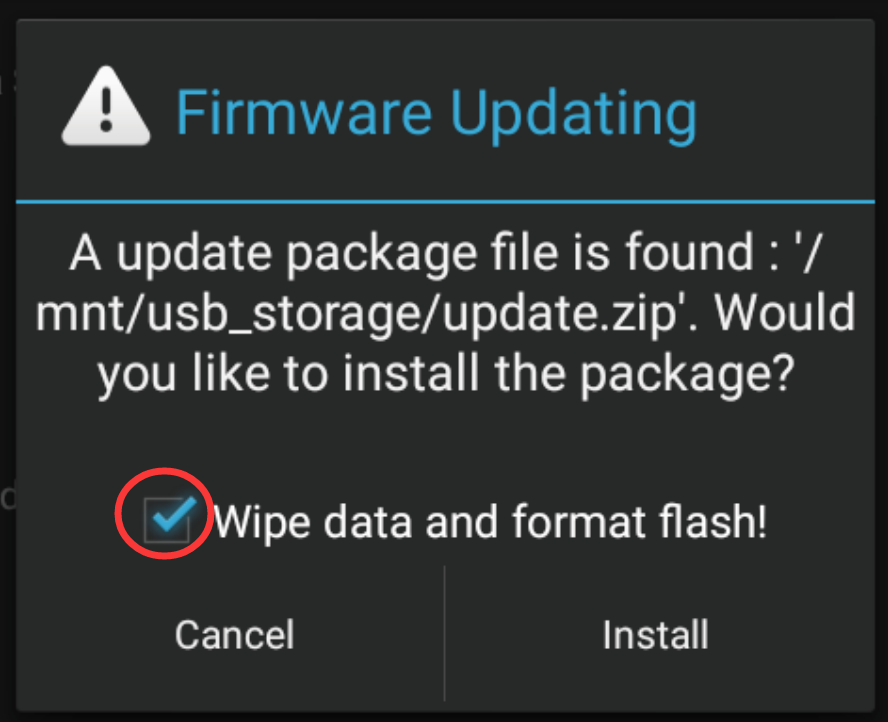
@Support Dasaita it's max11 but I do have vivid launcher installed from google play
@Lewis C
Hello.
Please check the update tutorial below then give it a shot.
Update File:
System Firmware-MAX11-20231216:
https://www.dropbox.com/scl/fi/w0wrjc80ksuxy3fe08gjw/update.zip?rlkey=tyoc18w33q1py8o1ooo2gw7yr&dl=0
Tips:
1.
Download above update file via your computer/laptop.
2.
Format USB drive to FAT32 Format.
3.
Copy the file “update.zip” to the root directory of USB drive.
4.
Insert USB drive into the unit via USB cable;
then it will pop up automatically a window of update.
Alternatively, please manually go "Settings > System > System updates" to start the update.
***NOTE:
Please make sure that you have ticked option "Wipe data and format flash!".
Reference Operation Video:
https://www.youtube.com/watch?v=daXfUSMZt4Q&list=PLj4nbXKzYYkwxHfNGsONeDiqWzPmn8rAt
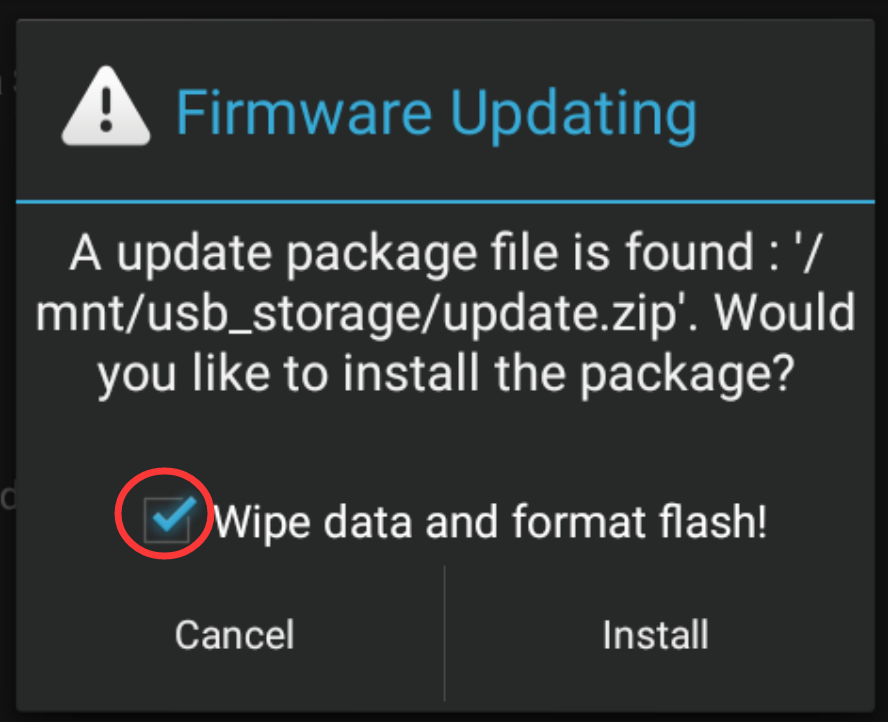
@Support Dasaita is there two separate volumes? One for promt and one for media volume?! Those updates fixed the messaging issue but when it reads it out. It's extremely quiet and I'll turn the radio up to hear them, then the music is extremely loud. Since it's all just one volume. Thanks for your time.
@IceyBiah
Hello.
Regret to tell you the Google Assistant volume doesn't support to be controlled individually.
Different applications may handle sound settings in their own way.
In this issue, the better way is to adjust the volume of the system to a comfortable level keeping the balance of voice assistant volume and music volume.
This is just like when we use mobile phones, when listening to music and a phoning call comes in, then the voice of the phoning call will be louder or lower.
We have forwarded your case to our technician.
If a solution becomes available in the future, we will notify you.
Thanks for your understanding and patience.
Hello, I need the latest firmware and ZLink update for my head unit.
Build Number: QCM6125 13 S10A_123 eng.hct.20241220.111810 NA
MCU: MTCHS_HA4Z_V4.15a_1
ZLink: 5.4.79
Vehicle: 2018 Toyota 4Runner
Phone: Samsung Galaxy Z Fold 7
Wireless Android Auto disconnects and reconnects every 3–5 minutes. Please send the latest compatible firmware and MCU update.