Playing songs from usb.
-
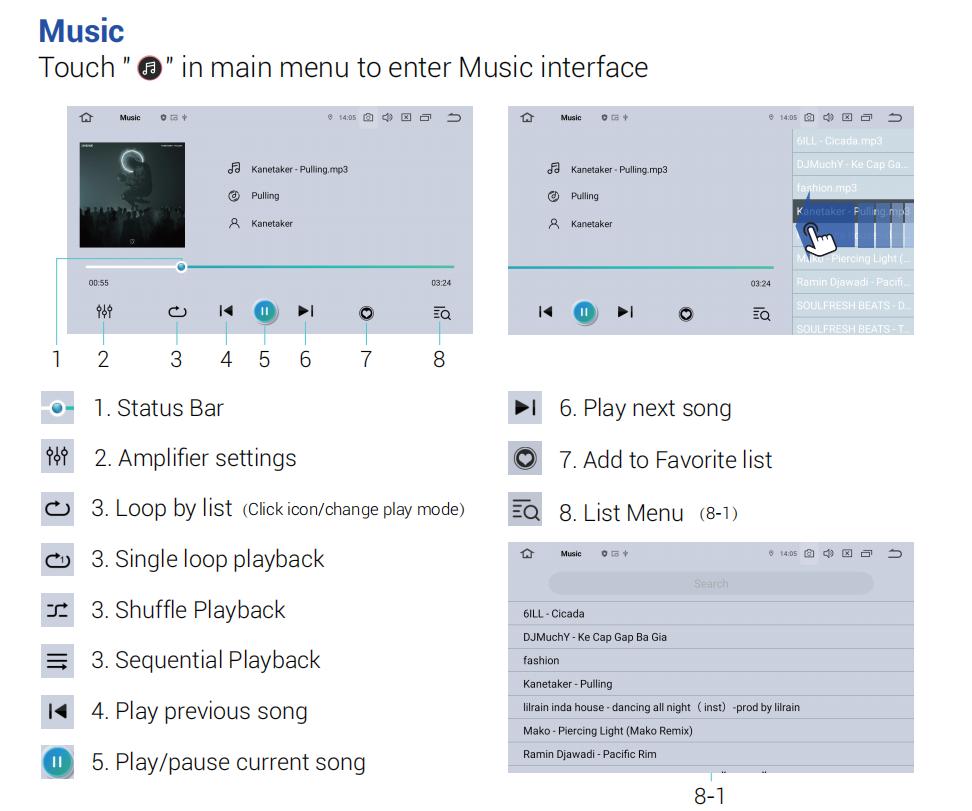
How do I set it to play all songs on usb from top down (alphabetically)? Currently, it either plays random songs, loops a song i chose , or plays a song i chose then plays 1st song on the list.
I want to set it to play a song, then automatically play next song on the list. Any help is greatly appreciated.
-
@sbinhn Hi,
Please tap the playback mode icon (#3) until it changes to Sequential Playback mode.
In this mode, the player should play the songs in the current list in order. For example, if you select a song, it should automatically continue with the next song shown below it in the list.
Please note that the playback will follow the current order of the song list. If the songs are already displayed alphabetically, they should then play from top to bottom in that order.
-
-
