Hello everyone, I'm posting my request here because yesterday I made a serious mistake when accessing the factory settings with code 126. I essentially changed the touchscreen buttons located on the left of the display (photo attached, circled in red).
It happened because I wanted to change the button with the musical note (second from the top), which usually opens the playback options, and I wanted to set it to open an online radio app. Instead, they were changed in such a way that they are unusable, and I wanted to return to the correct factory settings.
I also tried a complete reset of the radio, but that didn't help.
Thanks for your help.
In any case, I'm also attaching photos of the system after the reset.
P.S.: I can't even update the correct firmware; the app runs but doesn't update.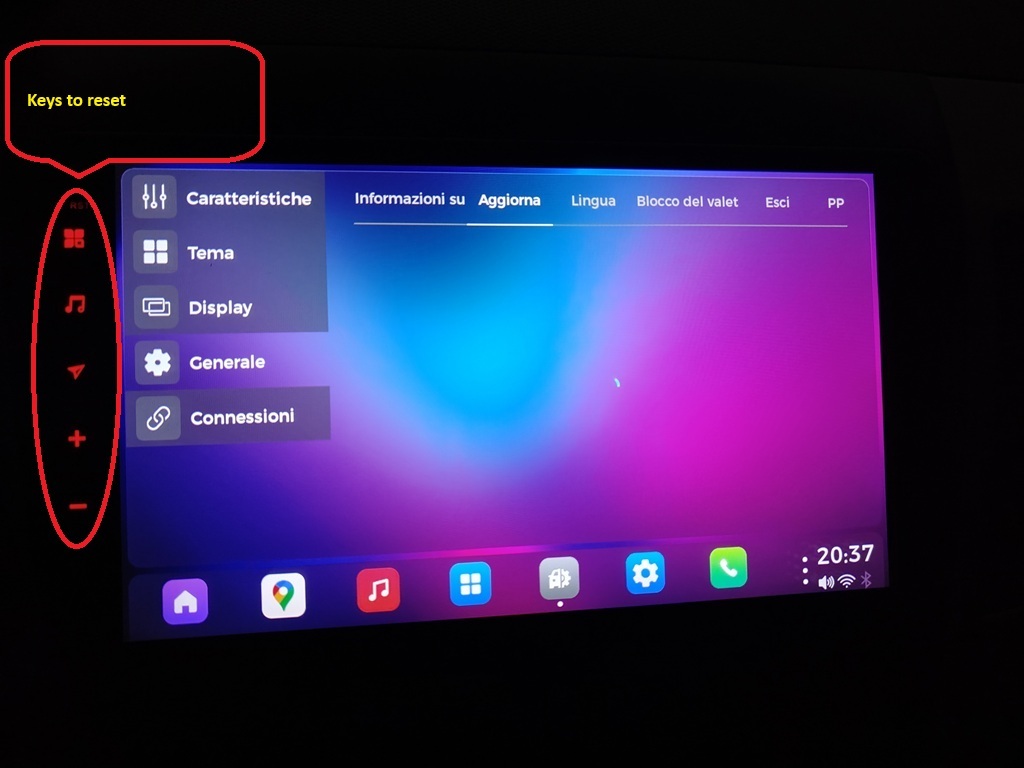
@Angelo AMICI Here is the instruction to reset the touch key buttons.
1.Go to Settings > Car > Factory Settings > enter 126.
2.Click on Key Study > Touch key study to enter the learning interface.
3.Click on +1+2 to calibrate the screen first, then tap the button to assign the desired features, finally click on"SAVE EXIT".
https://youtu.be/Is1yyN3BegI?si=AXaLcKqrWHY8IoJ6
If still no luck, could you send us your order number so that we could locate your order detail and then give you more accurate instruction?
Thank you for your cooperation in advance!
Thank you so much for your time and prompt assistance; thanks to your guidance, I was able to restore the buttons to working properly. Now, however, I'm still having trouble updating the firmware after performing a factory reset.
@Angelo AMICI Here is detailed instruction of firmware update:
Vivid11(20250401):
https://www.dropbox.com/scl/fi/gvynerjbwf5qlcap3bphs/update.zip?rlkey=v1p7o6vppnyfpm9cgwguqwak2&dl=0
Tutorial:
https://www.dasaita.com/community/forum/topic/37249/how-update-firmware
If still no luck, you could further demonstrate the situation so that we could better diagnose.
Thanks for your help, following the guide solved the problem; the SCOUT launcher wouldn't update, now everything is up to date.
