Troubleshooting Steering Wheel Control Issues with Canbus
-
If your vehicle has the Canbus box, and the steering wheel controls are not working, please follow these steps for initial troubleshooting:
Verify if the Canbus option has been chosen correctly:
Go to Settings > Car > Factory Settings(126) > Canbus > choose option 8 if your vehicle is Toyota. (You could refer to the installation instruction to check this option, alternatively, contact with CS team)
If the Correct Setting is Already Selected:
If the steering wheel controls still do not function after confirming the option, please kindly manual set the steering control, here is the instruction:
https://www.dasaita.com/community/forum/topic/126390/how-to-start-wheelkey-study
If still no luck, please contact our CS Team for further assistance: 💌support@dasaita.com
-
-
-
-
@oliverokoye01
Hello.
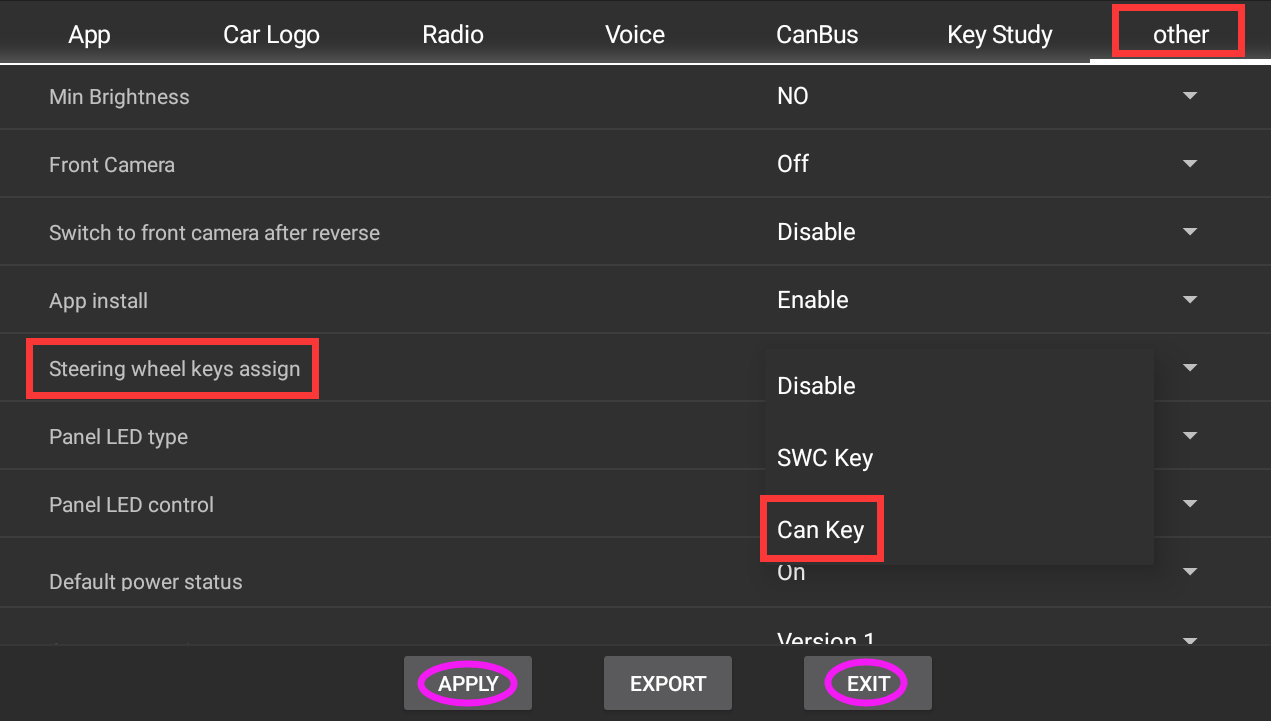
Please try to reprogram the steering wheel controls buttons as follows:
Step 1.
Settings > Car > Factory settings(password: 126) > Others > Steering wheel keys assign > Can Key > Apply > Exit(Reboot).
Step 2.
Settings > Car > Steering Wheel Keys > start to program
OR
just open the App "Wheelkey Study" to program.
Here enclosed the operation video for your reference:
https://www.dropbox.com/scl/fi/q7ue7qnm6uhq25sgz39gt/Video-Steering-wheel-keys-assign-Can-Key.mp4?rlkey=8xptcydovh8fypb7m17rl474m&st=25ja091i&dl=0