Hello, I have a G13 that I've been experiencing random reboots on. They will happen no matter what is happening on screen. Is there a newer MCU file to try updating to? Thanks.
@Ven I've been experiencing this same issue and I've reached out to the Dasaita support but they've yet to respond. I've been having this happen for almost a year now. Reboots once or twice a day. And right after I have to manually restart it again otherwise android doesn't connect.
@Support Dasaita
@Dasaita Official
Same issue: Zlink Android Auto keeps rebooting randomly
@Jinson
Hello.
In order to help you better, please provide below Build Number&MCU version picture to our email address and indicate your Order ID# in email subject.
Thanks in advance.
Email: support@dasaita.com
Go: Settings > About Machine > Build Number; MCU version
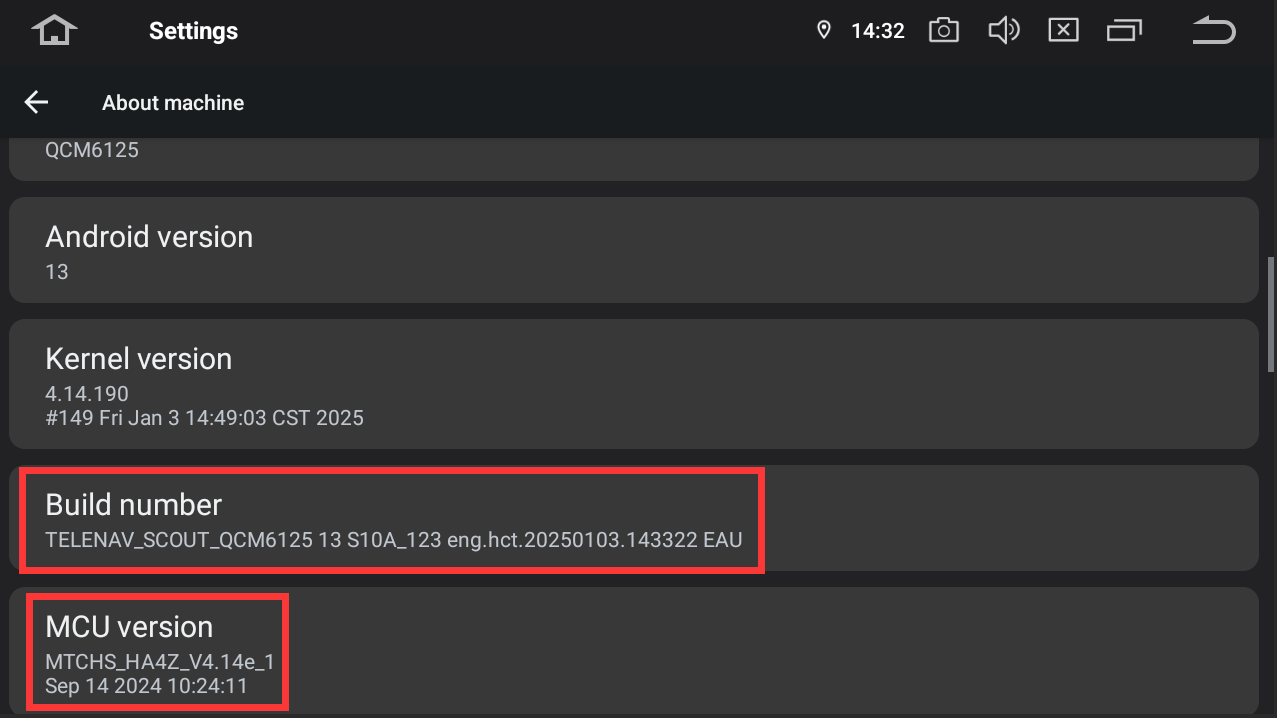
I have exactly the same issue with random reboots and a second restart seems to fix the android auto issue.. @dasaita please fix this :-)
- Android: 13
- SoC: Qualcomm QCM6125 (from the build number)
- Kernel: 4.14.190
- Build:
QCM6125 13 S10A_123 eng.hct.20240903.141210 EAU
- MCU:
MTCHS_HA4Z_V4.14_1
- MCU build date: July 23, 2024, 09:48:27
Thanks
Same issue on my G13. Keeps disconnecting and connecting every few minutes... 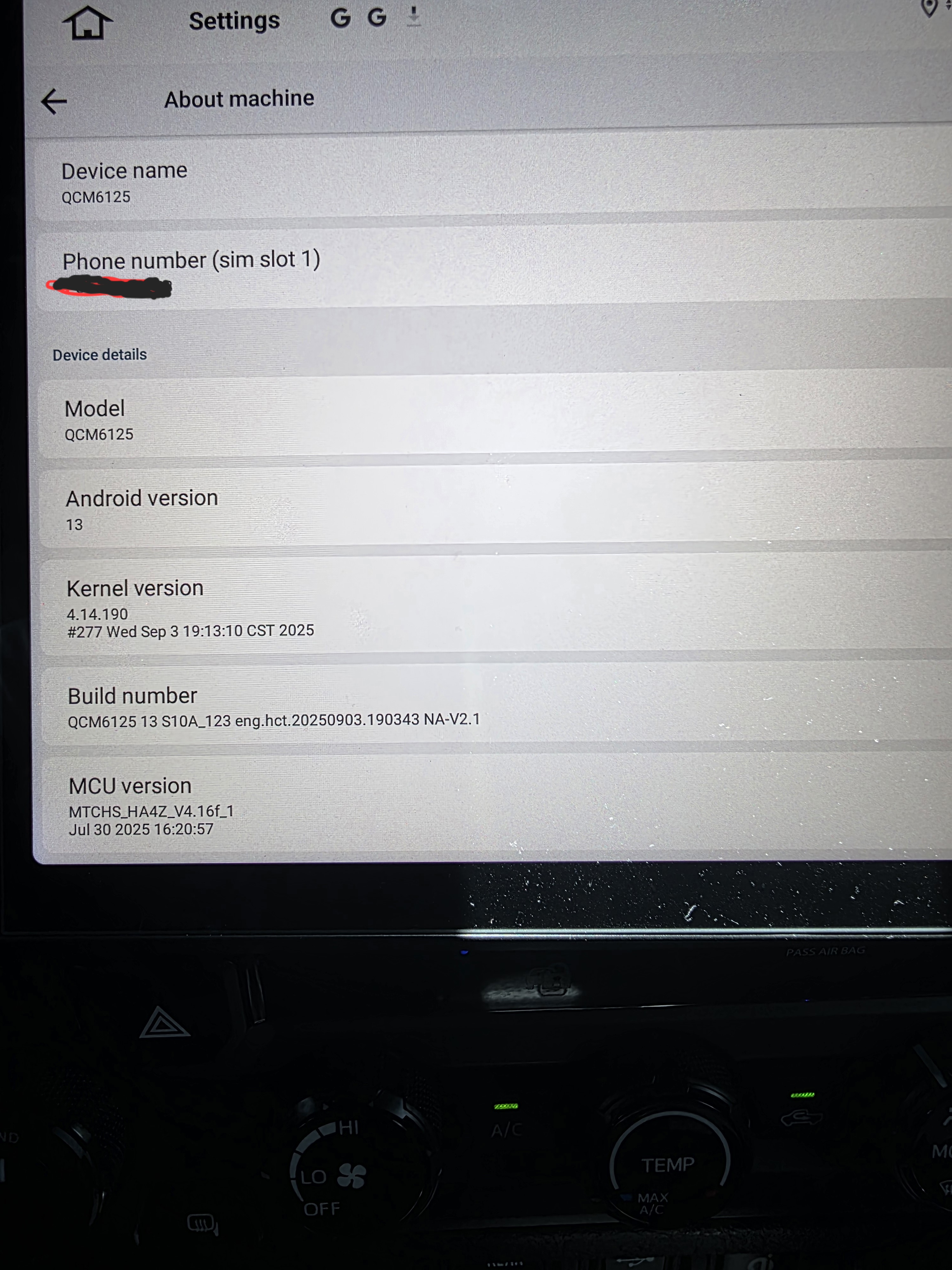
@renaldo rivera
Hello.
Please check the update tutorial below then give it a shot.
Update File:
System Firmware-G13-V2-20260410:
https://www.dropbox.com/scl/fi/jwoqmanj15r8ktlroloy6/update.zip?rlkey=my6wh60a4z2r555fw6zd6zx57&st=kdihaggb&dl=0
MCU-4.17f:
https://www.dropbox.com/scl/fi/9t1gp2mkk3ertqyybpf5j/hmcu.img?rlkey=rs1abdmvfbk53331a024bps8j&st=dzwvztlg&dl=0
Tips:
1.
Download above update file via your computer/laptop.
2.
Format USB drive to FAT32 Format.
3.
Copy the file “update.zip”&“hmcu.img” to the root directory of USB drive.
4.
Insert USB drive into the unit via USB cable;
then it will pop up automatically a window of update.
Alternatively, please manually go "Settings > System > System updates/MCU updates" to start the update.
***NOTE:
Please make sure that you have ticked option "Wipe data and format flash!".
Reference Operation Video:
https://www.dropbox.com/scl/fi/7tgvc28sn77ux6g6fmosm/MCU.mp4?rlkey=7p5940e12kb88a42zue6qntft&e=1&dl=0
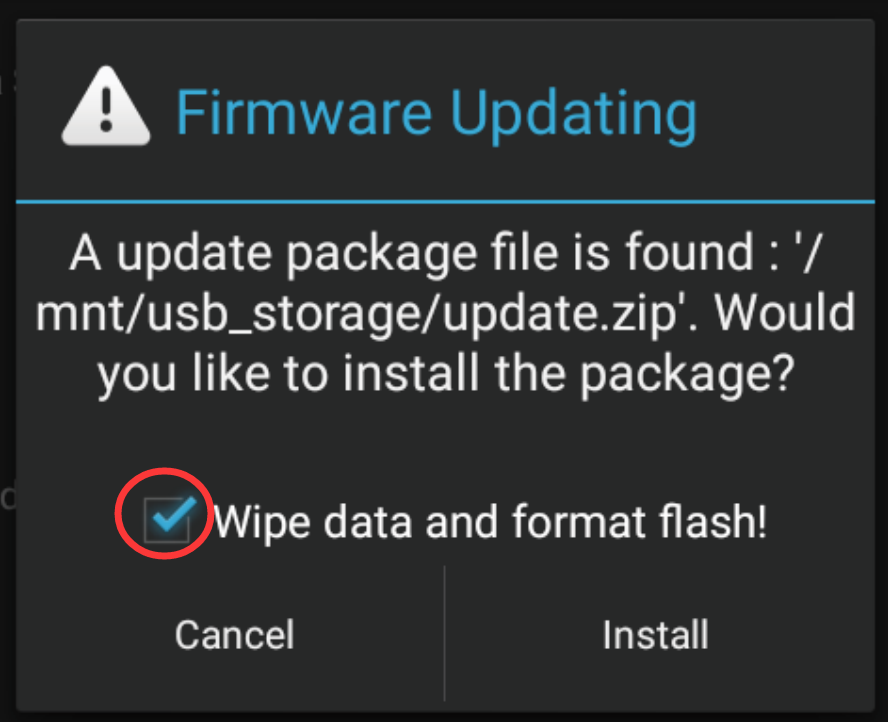
@Support Dasaita Can I try this too? Dont know if mine is V1 or V2 etc ... Thanks
- Android: 13
- SoC: Qualcomm QCM6125 (from the build number)
- Kernel: 4.14.190
- Build:
QCM6125 13 S10A_123 eng.hct.20240903.141210 EAU
- MCU:
MTCHS_HA4Z_V4.14_1
- MCU build date: July 23, 2024, 09:48:27
@Stephen Maher
Hello.
Please check the update tutorial below then give it a shot.
Update File:
System Firmware-G13-20260409:
https://www.dropbox.com/scl/fi/h1e688co7vr53z30rtdlk/update.zip?rlkey=loanzw1z5hay4q0erpzj05qte&st=lp62ulvd&dl=0
MCU-4.17f:
https://www.dropbox.com/scl/fi/9t1gp2mkk3ertqyybpf5j/hmcu.img?rlkey=rs1abdmvfbk53331a024bps8j&st=dzwvztlg&dl=0
Tips:
1.
Download above update file via your computer/laptop.
2.
Format USB drive to FAT32 Format.
3.
Copy the file “update.zip”&“hmcu.img” to the root directory of USB drive.
4.
Insert USB drive into the unit via USB cable;
then it will pop up automatically a window of update.
Alternatively, please manually go "Settings > System > System updates/MCU updates" to start the update.
***NOTE:
Please make sure that you have ticked option "Wipe data and format flash!".
Reference Operation Video:
https://www.dropbox.com/scl/fi/7tgvc28sn77ux6g6fmosm/MCU.mp4?rlkey=7p5940e12kb88a42zue6qntft&e=1&dl=0
Bump @Support Dasaita Is it safe to try this on my own unit too? Thanks :-)
@Stephen Maher
Hello.
If you unit can work well, we recommend keeping the current version to use, it doesn't need to update.
I have the same issue, where the unit randomly reboots and requires a double restart in order to fix the issue.. Android auto will not connect unless its restarted a second time...
Can you confirm this firmware and MCU will asbolutely work with my unit?
Thanks :-)
- Android: 13
- SoC: Qualcomm QCM6125 (from the build number)
- Kernel: 4.14.190
- Build:
QCM6125 13 S10A_123 eng.hct.20240903.141210 EAU
- MCU:
MTCHS_HA4Z_V4.14_1
- MCU build date: July 23, 2024, 09:48:27
@Stephen Maher
Hello.
Please check the update tutorial below then give it a shot.
Update File:
System Firmware-G13-20260409:
https://www.dropbox.com/scl/fi/h1e688co7vr53z30rtdlk/update.zip?rlkey=loanzw1z5hay4q0erpzj05qte&st=lp62ulvd&dl=0
MCU-4.17f:
https://www.dropbox.com/scl/fi/9t1gp2mkk3ertqyybpf5j/hmcu.img?rlkey=rs1abdmvfbk53331a024bps8j&st=dzwvztlg&dl=0
Tips:
1.
Download above update file via your computer/laptop.
2.
Format USB drive to FAT32 Format.
3.
Copy the file “update.zip”&“hmcu.img” to the root directory of USB drive.
4.
Insert USB drive into the unit via USB cable;
then it will pop up automatically a window of update.
Alternatively, please manually go "Settings > System > System updates/MCU updates" to start the update.
***NOTE:
Please make sure that you have ticked option "Wipe data and format flash!".
Reference Operation Video:
https://www.dropbox.com/scl/fi/7tgvc28sn77ux6g6fmosm/MCU.mp4?rlkey=7p5940e12kb88a42zue6qntft&e=1&dl=0
