Dasaita is working on the T-Mobile sim issue which, apparently, is due to a change T-Mobile made to its system. As many of us G13 owners have found, roughly a month ago, all of our sims stopped connecting. This was true for any sim that uses the T-Mobile network, e.g. Speedtalk and Tello. The interim solution that I've found is to use an Internet of Things (IOT) sim from a provider that uses AT&T.
EIOTClub has dual network sims that provide AT&T and T-Mobile. I got one of their sims from Amazon and tested it in an old Samsung Note 8 phone. For it to work required creating a new APN set to america.bics and turning on Global Roaming. It registered immediately. I removed the sim from the phone and put in my G13. I didn't have to do anything -- the G13 immediately recognized the sim, registered it on the AT&T network, and I've got internet via LTE again.
You can get a 300 MB sim from Amazon for $5. If it works for you, you can buy a monthly plan. As I don't need much data, I got a 2GB / 30-day plan for $10/month. This a bit more than I was paying with SpeedTalk and Tello, but it works. :)
Don't forget to restart the G13 after installing the new sim.
I have no connection with EIOTClub, other than I bought a plan from them. There may be other AT&T-based sim cards out there that will work, but EIOTClub was the first I tried and it works well.
@Paul Tauger
Hello.
Thank you so much for sharing this detailed workaround for the T-Mobile SIM connectivity issue on G13 units.
We really appreciate your thorough testing and clear instructions for all other G13 owners.
Your solution is extremely valuable for us.
Our technical team is actively collecting relevant data for in-depth analysis of SIM card issue, hoping to fully resolve this fault as soon as possible.
It just stinks that the "reliable" work around is to pay for another service than the one you are already paying for. I really hope you're able to find a resolution soon that restores the prior functionality. I have been actively troubleshooting with your support teams and trying many of your solutions such 6/16.
@ManDoctor
Hello.
Thank you so much for your patience and detailed feedback.
Our technical team is still actively investigating this issue to develop a permanent fix that brings back all original features as before.
We will reach out to you immediately once we have a confirmed resolution.
We truly appreciate your continuous cooperation while we work to resolve this problem.
@Paul Tauger can you provide instructions on how to edit the APN and suggestions for those of us that don't have an old Samsung lying around?
@Paul Tauger Hello, that seems to be a good work around... BUT, how do I do this, "For it to work required creating a new APN set to america.bics and turning on Global Roaming."? Any help you can give is appreciated.
FYI, I tried an AT&T SIM staight from AT&T store, and it worked right away, BUT, its like $50 a month for unlimited... No Thanks...
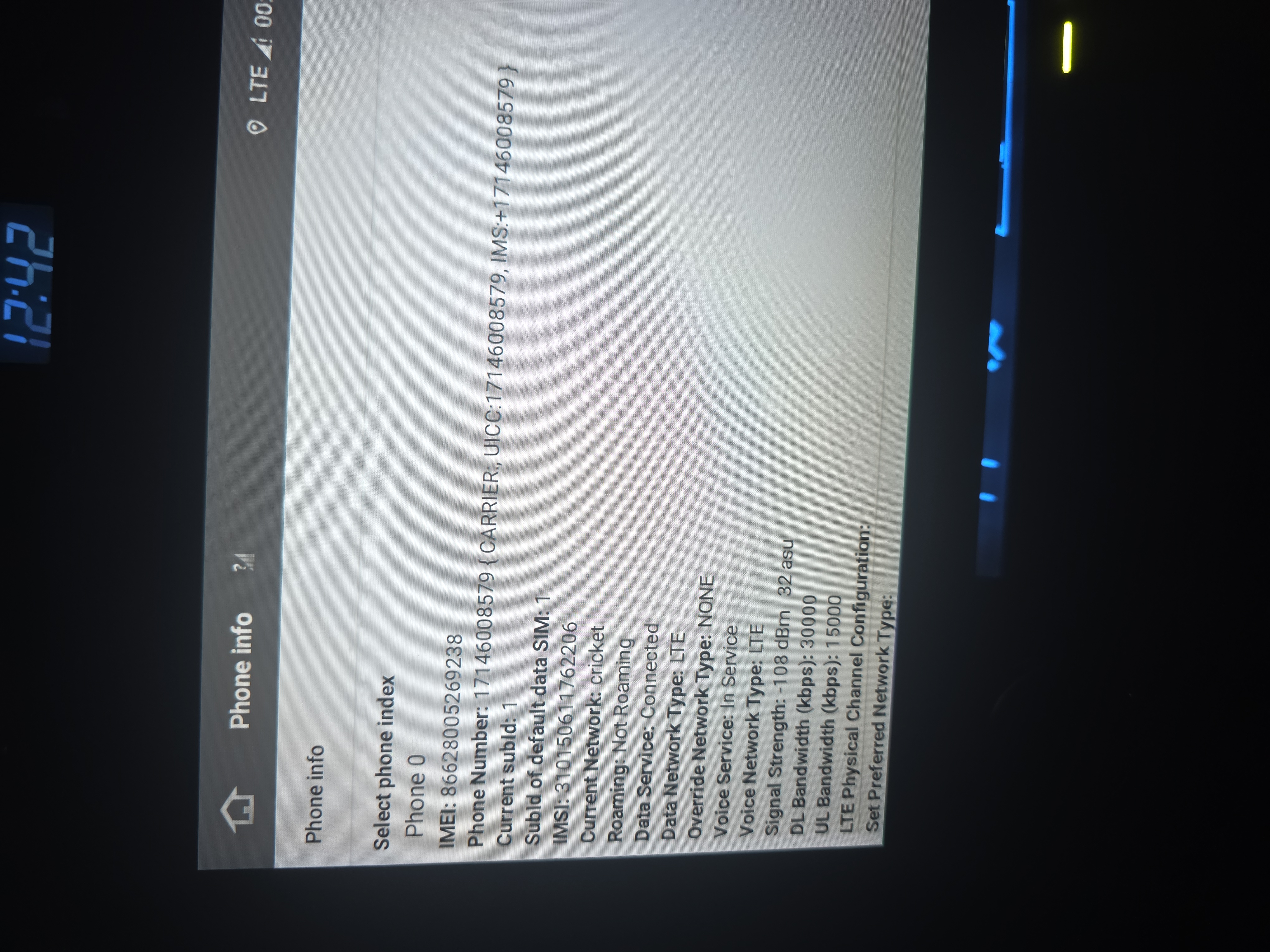
 @Dasaita I am currently trying to use a Cricket SIM (AT&T Network) in my Dasaita G13, and cannot get it to connect either. APN is correct, and Dasaita recognizes it, but when I click on "connect to network" box inside network settings, it pulls up Cricket's websites and says my device isn't compatible now?
I need an LTE connection to have my Dasaita run Life360 while it's on - in case it's stolen, I know where my car is.
@Support Dasaita did you guys find a fix yet?
@Oscar Martinez
Hello.
Please try to do as follows:
Go Settings > Network & internet > Mobile network > Preferred network type > LTE.
Here enclosed the video for your reference.
https://www.dropbox.com/scl/fi/gbogq3mihax9v5k8ytgs1/How-to-change-the-LTE.mp4?rlkey=xxtf3ezuqy1ivc7d5qadwy15m&e=3&dl=0
@Support Dasaita I have tried every single Network type, none of them work. Verizon, Cricket, AT&T, T-Mobile, TracFone SIMs all do the same thing.
My Dasaita G13 recognizes the SIM and phone number, the APN is correct, but I have no Internet access. I only see the (LTE📶!) symbol.
I'm tired of troubleshooting and spending so much money on SIM cards and mobile carrier plans only to find out nothing works.
@Oscar Martinez
Hello.
We apologize for any inconvenience this issue has brought you.
Our technical team is conducting an in-depth investigation to deliver a permanent solution.
We will contact you right away as soon as a definitive fix is finalized.
Thank you sincerely for your patience and continued support as we work through this matter.
What cell Bands does the unit support? EIOTClub sim card will not connect to T-Mobile either. Only AT&T. Tmobile told me the IMEI number for the unit isn't compatible with the network.
@Jaime Chacon
Hello.
Sorry for the T-Mobile network is not currently supported.
If you happened have a AT&T SIM card on hand, please give it a shot.
@Support Dasaita what's the status on this? When can we expect a resolution?
@DJ Horton Please provide your order ID and issue to our support email.
support@dasaita.com
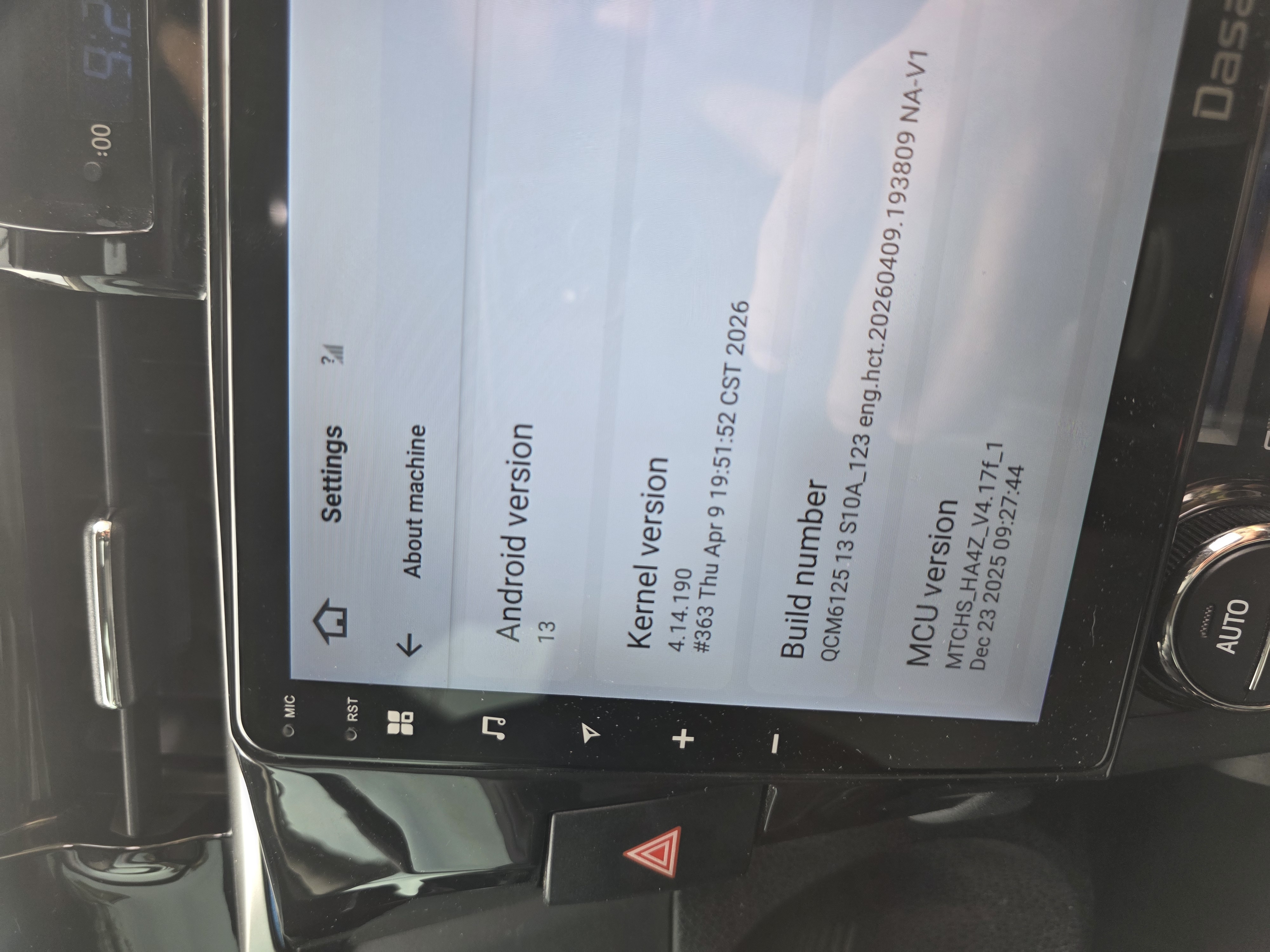
It seems that T-Mobile is starting to phase out the 4G service which is rendering the 4G sims useless. Dasaita needs to address this and come up whicha firmware fix so that the Dasaita Units work. I paid a lot for the radio to use this feature and will not be able to use it as intended.
@Support Dasaita There are 2 issues here, one is that Dasaita head unit use a 14 number IMEI and carriers us 15 number IMEI and they are not supporting the 14 number IMEI also T-Mobile is phasing out 4G little by little andthis is an issue with the head unit being they you use 4G. Correct me if I am wrong. So it's one of two thing, Dasaita has to find a way to chnage the IMEI to 15 numbers or find a fix for the 4G/5G issue.
A 14-digit number is techically incomplete because the 15th digit serves as a critical check digit calculating using Luhn Algorithm to verify the integrity and accuracy of the entire sequence. Without the final digit the system cannot instantly validate wheather the number is mistype or tranposted before attempting a network lookup and connection.
@Victor Rosario@Support Dasaita
THIS
An internet connected head unit was what we all paid for. FIX IT.
@Support Dasaita
Why? We're all having the same problem. Is providing my order number and problem to the support email going to magically fix everyone's internet connectivity issue? Please respond HERE so we can all see your answer.
@DJ Horton
We understand your concern.
We suggested email only because some troubleshooting may require order-specific information, software versions, photos, or logs that are easier to review there.
For general troubleshooting steps or confirmed solutions that may help everyone experiencing the same issue, we are happy to share them here as well.
----------------------------------------------------------------
There are many posts and comments here, so to make sure your case is not missed and can be followed up more quickly, we recommend contacting us by email.
For general solutions that may help everyone, we will still share them here whenever possible.
Please provide your order ID and issue to our support email.
support@dasaita.com
