I have a G13 for a 2016 Toyota 4Runner Limited with JBL. I do not get notification sounds for text messages. I have tried to turn on the notifications for ZLink in the settings, but when I exit the screen, the setting toggles off again. I have tried downloding the firmware updates listed above, but I get the same result. Is there a firmware and/or MCU update that is specific to the unit for my 4Runner?
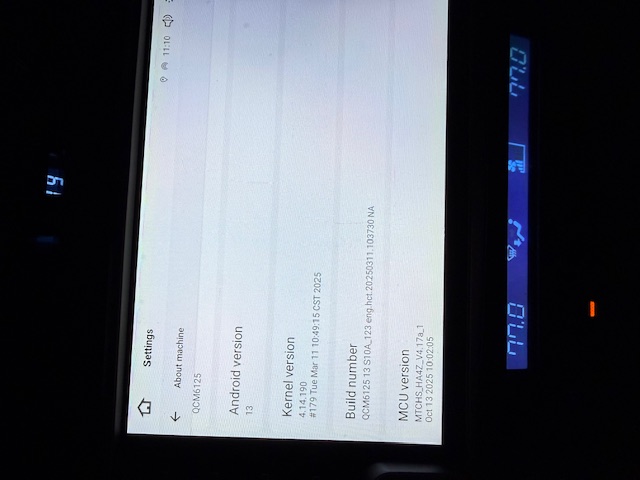
Thank you.
@Support Dasaita
I am having the same problem with my new dasaita g13 unit for my 2017 toyota tundra 1794 model.
Apple Caraplay text notification tones don't work here either. Starting to really regret buying this unit
@DJ Horton
Hi there,
The CarPlay text tone issue is usually a quick settings fix, not a problem with the unit itself.
- Enable "Announce Messages with Siri" in CarPlay settings.
- Turn off Do Not Disturb/Driving mode.
- Turn up volume when Siri reads messages (separate alert volume).
- Restart the phone and head unit.
Let us know if the problem continues.
@Support Dasaita no, this does not solve the problem. Doing it this way results in Siri reading the message automatically. I definitely do not want this. I just want it to simply ding like my Alpine, Sony, and the OEM I used to have, not to mention every rental car I've ever driven. Shouldn't have to do a deep dive into setting to get something so basic to just work. I've updated the firmware and the issue remains. It's probably an issue with ZLink but I'm locked out of the ZLink settings
Hi there, This is an iPhone setting instead of a head unit issue. To get only a chime without Siri auto-reading incoming texts on CarPlay:
- Go to iPhone Settings > Siri & Search > Announce Notifications > CarPlay
- Select Mute New Messages
- Keep notification sounds enabled, so you still hear the alert chime. Also check Driving Focus mode. Restart your phone and reconnect CarPlay after changing settings.
If still not work,please provide the phone's IOS to us.
@Support Dasaita
ok, so let me get this straight: it works fine on my Alpine head unit. It works fine on my Sony head unit. It worked fine on the OEM head unit, and it's worked fine on every rental car I've ever driven... and you're going with "it's not Dasaita, it's your iphone". That's your position?
And for the record your "fix" didn't work.
yesterday I was running iOS 26.whatever. Today I'm running iOS27. Didn't work yesterday, doesn't work today.
@DJ Horton if it's any consolation, and it most certainly is not, I'm using android auto on my new head unit for a Maverick and I don't have notification sounds either. At this point it may make more sense for me to just return the unit. I feel like I was sold shovelware.
@Justin L. exactly. I'm about as deep into buyers remorse as one can get

